


Only 1 in 3 Amazon Main Images Pass Every Rule: A Study of 824 Listings (2026)

Almost every guide to Amazon images quotes the same rules: a pure white background, the product filling about 85% of the frame, no extra props or text. Very few show how many real listings actually follow them. So I measured it. In November 2026 I checked the main images of 824 US Amazon listings across five categories against Amazon’s main image rules, using the same logic as my free Amazon main image checker, then reviewed a random sample of 100 by eye. The short version: about half pass the rules you can measure, and only about 1 in 3 pass everything.
Key findings
- 32% of main images pass every rule once a visual check is added (random sample of 100). 52% pass the four rules that can be measured: pure white background, 85%+ product fill, zoom size and a square frame.
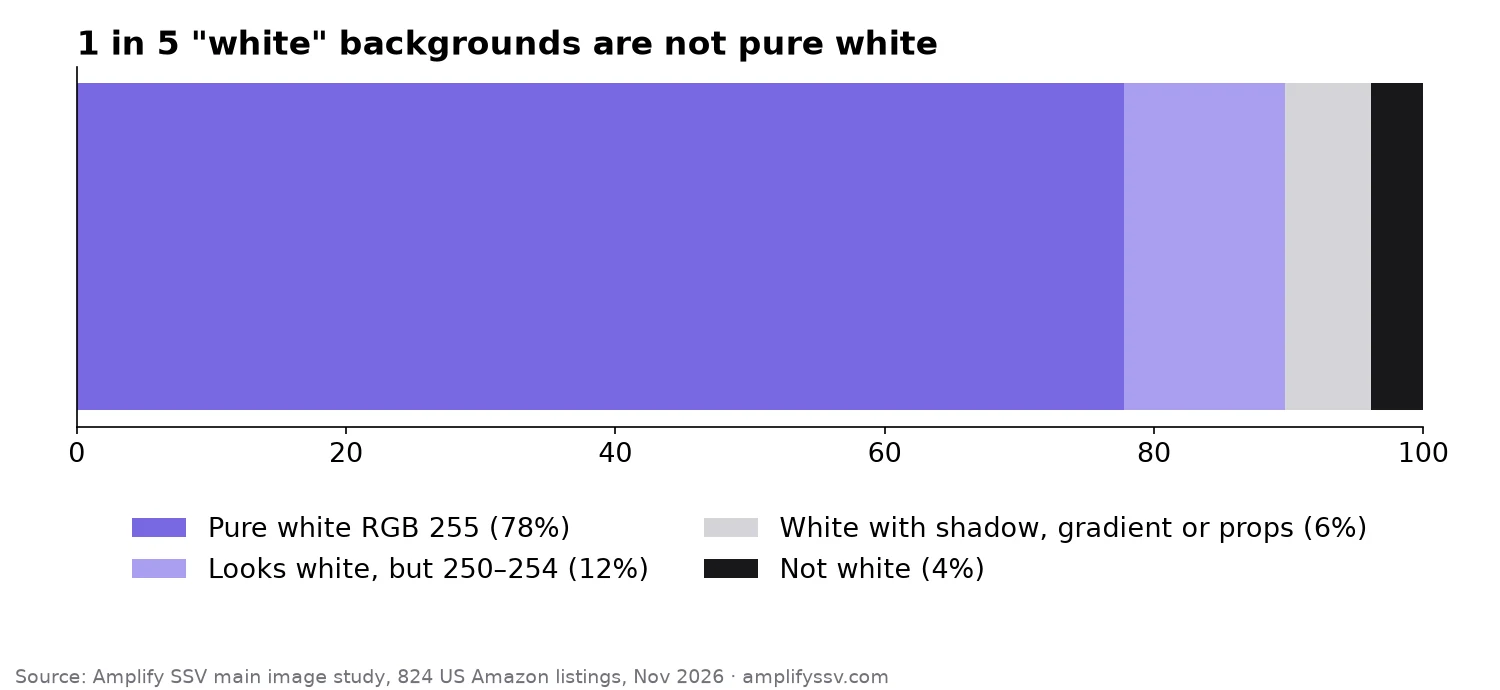
- 22% of backgrounds are not pure white (RGB 255). Most of those (12% of all images) look white but sit at RGB 250–254.
- 19% of white-background images have the product filling less than 85% of the frame. The median fill is 95%.
- 17% are not square, and 26% are below the 1,600 px size Amazon’s guides recommend (all pass the 1,000 px zoom minimum).
- 24% of the hand-reviewed images show things that aren’t in the box: fruit, flowers, texture swatches, animals or models. 6% add sales text such as “Black Friday deal” or “$52 value”.
- Best-selling listings were barely more compliant than the slowest sellers in their category (54% vs 53%).
How I ran the study
The sample. 824 US Amazon listings in five categories: pet supplies (200), haircare (200), fragrance (154), skincare (138) and supplements (132). Products came from a set of listings collected in November 2026 for my outreach research, which leans towards small and mid-size brands in beauty, wellness and pet. I took at most one product per brand, so no single brand skews the results, and chose them at random within each category. This is a large, varied sample, not a random sample of all of Amazon, so treat the numbers as a strong indication rather than a census.
The images. For each listing I downloaded the original main image file (the first image, which Amazon labels MAIN) from Amazon’s public image server, so the measurements use the exact file Amazon serves, not a screenshot.
The checks. Every image went through the same logic as my free checker:
- Background: the colour of the four corners, where a main image’s background shows even when the product fills the frame. Pure white means at least 97% of corner pixels are exactly RGB 255, 255, 255.
- Product fill: the longest side of the non-white area divided by the image’s longest side. Amazon’s guidance is about 85%.
- Size and shape: 1,000 px or more on the longest side for zoom, 1,600 px or more as Amazon’s guides recommend, and a 1:1 square.
The visual review. Code can’t reliably judge props, added text or collages, so I reviewed a random 100 of the 824 by eye against Amazon’s rules on items not included, text, badges and inset images.

1 in 5 white backgrounds are not pure white
78% of main images use a pure white background. Another 12% look white to the eye but are not RGB 255: their background sits at 250–254, a common result of editing, compression or a white that was never set to 255. 6% have white corners mixed with grey shadows, gradients or props, and 4% are not white at all: full-bleed photos, coloured backdrops or lifestyle scenes.
Does Amazon reject a 254 background? Its rule asks for RGB 255, 255, 255, and in practice enforcement is automated and not always consistent: plenty of 254 images are live. But a background that is technically off-white is one more reason for a suppression or a rejected re-upload, and it costs nothing to fix.
Category exceptions to the main image rules
The rules above are the default. Several categories change them, as summarised in 2026 seller guides that quote Amazon’s category style guides:
- Adult clothing: shown on a standing human model, front view. Mannequins aren’t allowed (socks and hosiery are the exception).
- Kids’ and baby clothing: shown flat, with no model.
- Shoes: a single shoe, facing left at about 45 degrees.
- Jewelry, watches, luggage and baby products: no human model on the main image.
- Books, music and video: the cover fills the whole frame.
- Beds, mattresses, rugs and sofas: a lifestyle main image is allowed.
- Dietary supplements: images must show the full real label on all sides, including the complete Supplement Facts panel. See my supplement image rules.
- Multipacks: the main image shows exactly the quantity being sold.
New in 2026: tag AI-generated people
In 2026 Amazon announced that images and videos containing photorealistic AI-generated people must be tagged before upload, in listings and A+ Content, in every Amazon store. Add the keyword contains-synthetic-performer to the XMP dc:subject field with any IPTC-compatible editor (Adobe Bridge, Lightroom or ExifTool). Amazon then shows shoppers an indicator where applicable.
- No tag needed: real people (even if retouched), images with no people, and people who aren’t photorealistic, such as illustrations.
- Products aren’t covered: the rule is about synthetic people. Amazon hasn’t announced a tag for rendered or AI-assisted product images.
- Dates: Amazon’s announcement gives no effective date. Seller guides report late July 2026, and say re-tagging older images is optional.
My own visuals never use AI-generated faces, so most product galleries I make need no tag at all.
Fill and framing: most products are big, a third touch the edge
Sellers have clearly heard the 85% message. The median white-background main image has the product filling 95% of the frame, and 81% reach the 85% guideline. The other 19% leave visible empty space, and 4% fill less than 70% of the frame, which makes the product look small next to competitors in search results.
The opposite problem is also common: a third of all main images (33%) have the product touching at least one edge of the frame. Sometimes that’s a deliberate tight crop, but Amazon asks for the whole product to be shown without cropping, and a product pressed against the edge reads as cut off at thumbnail size.

Square frames and file sizes
Every image in the sample clears the 1,000 px minimum that enables zoom, so the basic size rule is no longer the problem it was a few years ago. The most common sizes were 2,000 px (26% of images), 2,560 px (18%) and 1,600 px (15%). But 26% are still below the 1,600 px that Amazon’s guidance recommends for sharper zoom.
17% of main images are not square. A non-square main image is shrunk to fit Amazon’s square tiles, so the product ends up smaller than it could be and loses ground in search results without breaking any rule outright.
What the hand review found
The measurable rules only tell half the story. In the random sample of 100 images:
- 24% show items that are not part of the purchase: fruit and flowers around a bottle, cream swatches and splashes, capsules spilling with props, pets beside the product, or a model wearing it. Amazon’s rule is that the main image shows only the product being sold.
- 6% add text or badges that aren’t printed on the packaging, such as “Black Friday deal”, “$52 value” or “4 months supply”.
- 4% are collages, inset photos or lifestyle shots with a model rather than a product on white.
Combining those with the measured checks, only 32% of the sample passed every rule.
How to fix a suppressed listing
- Find the reason. Suppressed listings appear in your inventory view in Seller Central with the issue named. Image problems usually point to the main image.
- Check the usual causes: an off-white background, text or a logo, the product filling less than about 85% of the frame, visible packaging or tags, props, a mannequin, a cropped product, a blurry file, or a main image that shows a different product.
- Fix the file, then replace it. Upload the corrected image over the old one rather than deleting the main image first (a listing with no main image isn’t displayed). Export a fresh file: re-uploading the identical file can be treated as a duplicate.
- Check the upload status. The image submission and content compliance reports in Seller Central show whether the new file passed.
- Give it time. New images can take up to 72 hours to show on the live listing.
Not sure which rule you broke? Run the file through my free Amazon main image checker: it tests the white background, product fill, size and format in your browser.
Bulk upload: how to name your image files
Uploading many images at once? Amazon matches files to listings by their names: the product identifier, a variant code and the extension, separated by full stops, with no spaces or dashes.
| File name | What it becomes |
|---|---|
B0EXAMPLE1.MAIN.jpg | The main image (a file with no variant code is also treated as MAIN) |
B0EXAMPLE1.PT01.jpg to .PT08.jpg | Gallery images 2 to 9, in order |
B0EXAMPLE1.SWCH.jpg | The colour swatch shown on variation pages |
The identifier can be the ASIN, ISBN-13, EAN, JAN or UPC. Images can take up to 72 hours to appear after upload.
Amazon image requirements checklist
Copy this into your launch doc and tick it off before every upload:
- ☐ Main image background is pure white (RGB 255, 255, 255), not off-white
- ☐ Product fills 85% or more of the frame and isn’t cropped
- ☐ No text, logos, badges, watermarks, borders or inset images on the main image
- ☐ Only what’s included in the purchase is shown on the main image
- ☐ The main image shows the exact product and quantity sold
- ☐ 2,000 × 2,000 px (at least 1,000 px for zoom), JPEG, sRGB
- ☐ At least 6 images; video planned for a listing with fewer than 6 images if you want it in the main block
- ☐ Every number on a slide matches the label or spec sheet
- ☐ Category exceptions checked (clothing, shoes, jewelry, supplements and others)
- ☐ Photorealistic AI-generated people tagged
contains-synthetic-performer - ☐ Bulk files named ASIN.MAIN.jpg, ASIN.PT01.jpg and onwards
- ☐ Gallery text readable on a phone without zooming
By category, and best sellers vs the rest
No category does much better than a coin flip on the four measured rules: haircare 58%, skincare 51%, pet 51%, fragrance 49% and supplements 49%. Pet listings had the most non-white backgrounds (10%), and fragrance and skincare the most images under 85% fill, often because tall bottles leave empty space on a square canvas.
I also compared the best-ranked third of each category with the worst-ranked third by sales rank. The difference was small: 54% of best sellers passed the measured rules against 53% of the slowest sellers. A compliant main image doesn’t guarantee sales, and plenty of top listings break the rules. But a main image that breaks them carries a risk of suppression that a compliant one doesn’t, and the fixes are usually quick.
Using this data: you’re welcome to cite these findings and use the charts with a link to this page as the source. If you’d like the underlying numbers for an article, reply to any of my emails or use the contact page.
Frequently Asked Questions
What percentage of Amazon main images follow Amazon’s rules?
In this study of 824 US listings, 52% passed the four measurable rules (pure white background, 85%+ product fill, 1,000 px+ and a square frame), and only 32% passed every rule once a hand review for props, added text and collages was included.
Will Amazon reject a main image with an RGB 254 background?
Amazon asks for pure white, RGB 255, 255, 255. Enforcement is automated and not always consistent, so many 254 images are live, but an off-white background is an avoidable risk of suppression or a rejected upload. 12% of the images in this study were in that 250 to 254 range.
Do best-selling Amazon products have more compliant main images?
Only slightly. The best-ranked third of each category passed the measured rules 54% of the time, against 53% for the slowest-selling third. Compliance doesn’t create sales on its own, but it removes the risk of a suppressed listing.
How can I check my own Amazon main image?
Use the free Amazon main image checker on amplifyssv.com. It tests the background, product fill, size and format in your browser, without uploading the image anywhere.
Final Thoughts
The rules for an Amazon main image are simple, but only about a third of the listings in this study follow all of them. The most common gaps are the easiest to fix: set the background to true RGB 255, make the canvas square, give the product 85% or more of the frame without cropping it, and keep anything that isn’t in the box out of the main image. Check yours in seconds with my free Amazon main image checker, see every rule with sources in the 2026 Amazon image requirements guide, or let me design a main image that passes and wins the click through my Amazon listing image service. To score the rest of your gallery, try the free Amazon listing image grader.

Abdenour is the founder and creative director of Amplify SSV, where he creates 3D product renders, Amazon listing images, product animation and packaging design for consumer brands. More about Abdenour.


